Showing posts with label SYSADMIN AND AOL. Show all posts

Friday, October 27, 2017

Oracle Applications : Opening Periods


What is Period:

1. An interval of time characterized by the occurrence of a certain condition, event, or phenomenon: a period of economic prosperity.

2 Geology A unit of time, longer than an epoch and shorter than an era.

Significance Of Opening Periods in Oracle apps:

TO OPEN MONTHLY PERIODS OF DIFFERENT MODULES OR NEXT YEAR AND FOLLOW THE BELOW STEPS

1. HOW TO OPEN INVENTORY PERIODS (INV) :

Follow the below given navigation path :

INVENTORY - > ORACLE INVENTORY - > ACCOUNTING CLOSE CYCLE - > INVENTORY ACCOUNTING PERIODS

Oracle Inventory Periods


2. HOW TO OPEN PAYABLE PERIODS (AP):

Follow the below given navigation path :

PAYABLES - > ORACLE PAYABLES - > ACCOUNTING - > CONTROL PAYABLES PERIODS

Oracle AR Periods


3. HOW TO OPEN RECEIVABLE PERIODS (AR) :

Follow the below given navigation path :

RECEIVABLES - > ORACLE RECEIVABLES - > CONTROL - > ACCOUNTING - > OPEN/CLOSE PERIODS

4. HOW TO OPEN GENERAL PERIODS (GL) :

Follow the below given navigation path :

GENERAL SUPER LEDGER - > SETUP - > OPEN/CLOSE


5 Navigate to Purchasing SuperUser->Setup->Financials->Accounting->Control Purchasing Periods , then enter the Fiscal year and click Go button.

(If it prompts for selecting Operating Unit,select it and click Go button.)

Oracle Purchasing Periods


Query to get whether accounting period or not?

SELECT   application_id
into     g_application_id
  FROM   fnd_application_tl
 WHERE   application_name = 'Receivables'


SELECT   SET_OF_BOOKS_ID INTO P_SOB_ID FROM GL_SETS_OF_BOOKS

P_ACCOUNTING_DATE IS YOUR period

FUNCTION validate_gl_accounting_date (p_accounting_date   IN DATE,
                                      p_sob_id            IN NUMBER)
   RETURN BOOLEAN
IS
   v_count   NUMBER := 0;
BEGIN
   SELECT   COUNT ( * )
     INTO   v_count
     FROM   gl_period_statuses gps
    WHERE       gps.application_id = g_gl_application_id
            AND gps.set_of_books_id = p_sob_id
            AND gps.closing_status IN ('O', 'F')
            AND p_accounting_date BETWEEN NVL (gps.start_date,
                                               p_accounting_date)
                                      AND  NVL (gps.end_date,
                                                p_accounting_date);

   IF v_count > 0
   THEN
      RETURN TRUE;
   ELSE
      RETURN FALSE;
   END IF;
END validate_gl_accounting_date;

Wednesday, October 25, 2017

Interface Tables/Programs in Oracle Apps R12

Interface Tables/Programs in Oracle Apps R12

=======================================================================
PO Requisition Creation
=======================================================================
## Interface Tables:

PO_REQUISITIONS_INTERFACE_ALL

## Error Table
PO_INTERRFACE_ERRORS

## Base Tables:

PO_REQUISITIONS_HEADERS_ALL                      
PO_REQUISITION_LINES_ALL      
PO_REQ_DISTRIBUTIONS_ALL

## Oracle Seeded Concurrent Program

   Requisition Import
 
=======================================================================
Purchase Orders Creation
=======================================================================
## Interface Tables:

PO_HEADERS_INTERFACE
PO_LINES_INTERFACE
PO_DISTRIBUTIONS_INTERFACE

## Error Table
PO_INTERRFACE_ERRORS

## Base Tables:

PO_HEADERS_ALL
PO_LINES_ALL
PO_DISTRIBUTIONS_ALL

## Oracle Seeded Concurrent Program

Import Standard Purchase Orders

=======================================================================
Sales Orders Creation
=======================================================================
## Interface Tables:

OE_HEADERS_IFACE_ALL
OE_LINES_IFACE_ALL

## Base Tables:

OE_ORDER_HEADERS_ALL
OE_ORDER_LINES_ALL

## Oracle Seeded Concurrent Program

 Order Import

=======================================================================
Price List Creation
=======================================================================
## Interface Tables:

QP_INTERFACE_LIST_HEADERS
QP_INTERFACE_LIST_LINES
QP_INTERFACE_PRICING_ATTRIBS

QP_INTERFACE_ERRORS

## Base Tables:

QP_LIST_HEADERS
QP_LIST_LINES
QP_PRICING_ATTRIBUTES

## Oracle Seeded Concurrent Program

QP: Bulk Import of Price List

=======================================================================
Customers Creation
=======================================================================
## Interface Tables:

RA_CUSTOMERS_INTERFACE_ALL
RA_CUSTOMER_PROFILES_INT_ALL
RA_CONTACT_PHONES_INT_ALL


## Base Tables:

HZ_PARTIES
HZ_PARTY_SITES
HZ_LOCATIONS
HZ_CUST_ACCOUNTS_ALL
HZ_CUST_ACCT_SITES_ALL
HZ_CUST_SITE_USES_ALL
HZ_CUSTOMER_PROFILES
HZ_CUST_PROFILE_CLASSES
HZ_PARTY_RELATIONSHIPS
HZ_CONTACT_POINTS
HZ_ORG_CONTACTS

## Oracle Seeded Concurrent Program

Customer Interface

=======================================================================
Items Creation
=======================================================================
## Interface Tables:

MTL_SYSTEM_ITEMS_INTERFACE
MTL_ITEM_REVISIONS_INTERFACE
MTL_ITEM_CATEGORIES_INTERFACE
MTL_INTERFACE_ERRORS

## Base Tables:

MTL_SYSTEM_ITEMS_B
MTL_ITEM_REVISIONS_B
MTL_CATEGORIES_B
MTL_CATEGORY_SETS_B
MTL_ITEM_STATUS
MTL_ITEM_TEMPLATES
   
## Oracle Seeded Concurrent Program

   Item Import
=======================================================================
Suppliers Creation
=======================================================================
## Interface Tables:

AP_SUPPILERS_INT
AP_SUPPLIER_SITES_INT
AP_SUP_SITE_CONTACTS_INT
AP_SUPPLIER_INT_REJECTIONS

## Base Tables:

AP_SUPPLIERS
AP_SUPPLIER_SITES_ALL
AP_SUPPLIER_CONTACTS

## Oracle Seeded Concurrent Program

Supplier Open Interface Import
Supplier Sites Open Interface Import
Supplier Site Contacts Open Interface Import

Wednesday, October 18, 2017

PROFILE OPTIONS IN ORACLE APPS R12 - OVERVIEW (FND PROFILE)

Profiles are the changeable options which affect the way Oracle Application runs. Moreover, Moreover, The profile option acts like a Global Variable in Oracle. It is needed to provide the flexibility to Oracle Applications.

Types:

The profiles are of two types those are given below.
1. System Profile and
2. User Profile.

About DIFFERENT LEVELS a Profile value can be set:

The Profile values will be set in different levels those are given below.
1. Site
2. Application
3. Responsibility
4. User
5. Server
6. Organization

Site: This field displays the current value, if set, for all users at the installation site.
Application: This field displays the current value, if set, for all users working under responsibilities owned by the application identified in the Find Profile Values block.
Responsibility: This field displays the current value, if set, for all users working under the responsibility identified in the Find Profile Values block.
User: This field displays the current value, if set, for the application user identified in the Find Profile Values block.
Profile: Enter the name of the profile option whose values you wish to display.

Navigation to set Profile Values

 SYSTEM PROFILE: 

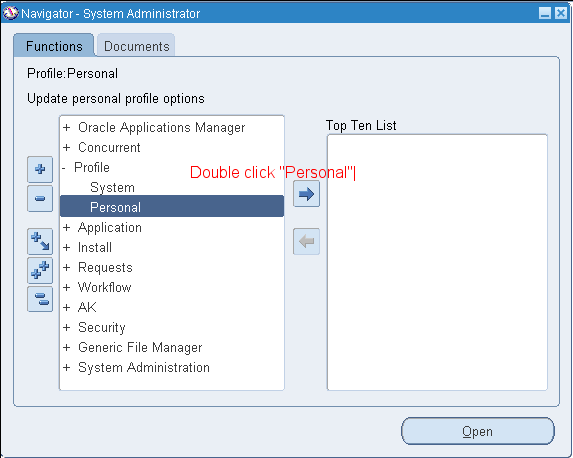
Responsibility SYSTEM ADMINISTRATOR -->


You may search for profile options using character strings and the wildcard symbol (%). For example, to find all the profile options prefixed by "Concurrent:” you could enter "Conc%" and press the Find button.


PERSONAL PROFILE:

Responsibility SYSTEM ADMINISTRATOR -->

To view personal profiles enter into the query mode and enter the profile name which we have already then we get profile value details.


To check the validation done against the Profile value while setting:

Responsibility APPLICATION DEVELOPER -->


Use of the API FND_PROFILE

It is used to perform various actions related to profile values through PL/SQL. Some of the important ones are listed below

1. FND_PROFILE.GET(‘Name of the Profile’, variable name);
Example
SELECT fnd_profile.value('PROFILEOPTION')
      ,fnd_profile.value('MFG_ORGANIZATION_ID')
      ,fnd_profile.value('ORG_ID')
      ,fnd_profile.value('LOGIN_ID')
      ,fnd_profile.value('USER_ID')
      ,fnd_profile.value('USERNAME')
      ,fnd_profile.value('CONCURRENT_REQUEST_ID')
      ,fnd_profile.value('GL_SET_OF_BKS_ID')
      ,fnd_profile.value('SO_ORGANIZATION_ID')
      ,fnd_profile.value('APPL_SHRT_NAME')
      ,fnd_profile.value('RESP_NAME')
      ,fnd_profile.value('RESP_ID')
  FROM DUAL;


2. variable name := FND_PROFILE.VALUE(‘Name of the profile’);
3. FND_PROFILE.PUT(‘Name of the profile’, value of the profile);

Example
SET SERVEROUTPUT ON;
DECLARE
   v_conc_login_id      NUMBER;
BEGIN
   FND_PROFILE.put ('CONC_LOGIN_ID',1425);
   fnd_profile.get ('CONC_LOGIN_ID', v_conc_login_id);
   DBMS_OUTPUT.put_line (v_conc_login_id);
END;
Output:
1425
PL/SQL procedure successfully completed

The 1st and 2nd are same but, the only difference is FND_PROFILE.GET is the procedure and FND_PROFILE.VALUE is the function so, it return a value.  

Apart from the above procedures we have another important one named FND_PROFILE .SAVE used to set the profile values from backend. A detail regarding this API is available in another article. 

Thursday, September 28, 2017

Finding the name of a DFF in a seeded Form

The first step in enabling a Descriptive Flex Field (DFF) in a seeded Form is to find out the name of the DFF. Identifying a DFF involves the following steps:
1. Navigate to the Form which contains the DFF which needs to be identified. In this example, we will consider the Transactions Form under the Receivables Manager responsibility.
2. Click on the DFF and then go to Help>Diagnostics>Examine to open the  ‘Examine Field and Variable Values’ window, note down the Block and Field names.
3. In the ‘Examine Field and Variable Values’ window, select  $DESCRIPTIVE_FLEXFIELD$ as the Block and enter <BLOCK_NAME>.<FIELD_NAME> as the Field. <BLOCK_NAME> and <FIELD_NAME> are the values obtained in Step#2. Press the TAB key or click on the Value field. The name of the DFF will be displayed in the Value field along with the application under which it is registered.
4. You can now navigate to Application Developer>Flexfield>Descriptive>Register  and execute a query with the DFF name (obtained in Step#3) in the Title field to obtain the complete details of the DFF.

Dynamically enabling and disabling Concurrent Program Parameters

Dynamically enabling and disabling Concurrent Program Parameters

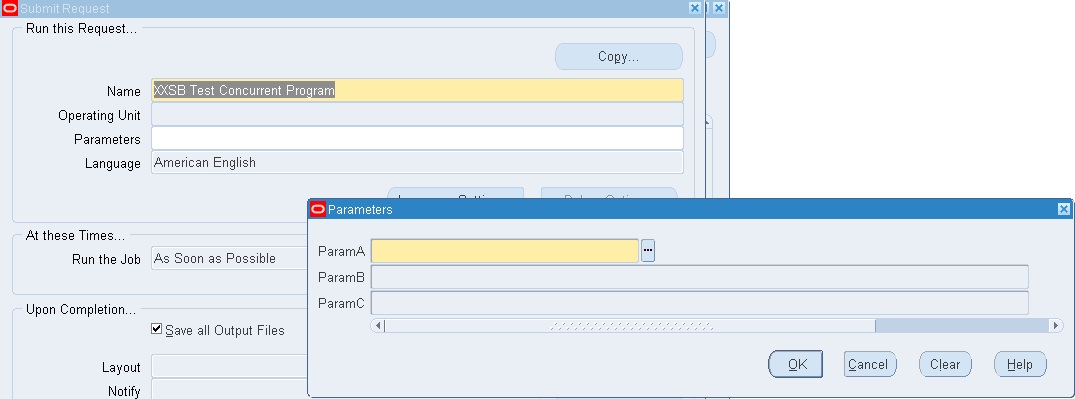
The first approach that might come immediatly to mind is to setup the three parameters ParamA, ParamB and ParamC in the manner and link them up using $FLEX$:
ParamA has value set VS1 attached to it. VS1 is of type Independent and has the values ‘ENABLE_B’ and ‘ENABLE_C’.
ParamB has value set VS2 attached to it. VS2 is of type Table and in the Where/Order By clause the condition :$FLEX$.ParamA=’ENABLE_B’ is added.
ParamC has value set VS3 attached to it. VS3 is of tye Table and in the Where/Order By clause the condition :$FLEX$.ParamA=’ENABLE_C’ is added.
When the program is run, both parameters are initially disabled.
But the moment we select a value for the first parameter, ParamA, both ParamB and ParamC get enabled thus defeating our purpose. The only consolation, if it may be so called, is that the list of value for ParamC contains no values.
The correct approach is to use two additional dummy parameters to enable or disable the second and third parameters. We will look into this appoach in more details.
1. ParamA has value set XXSB1_VS1 attached to it. The value set XXSB1_VS1 is of type Independent and contains two values ‘ENABLE_B’ and ‘ENABLE_C’
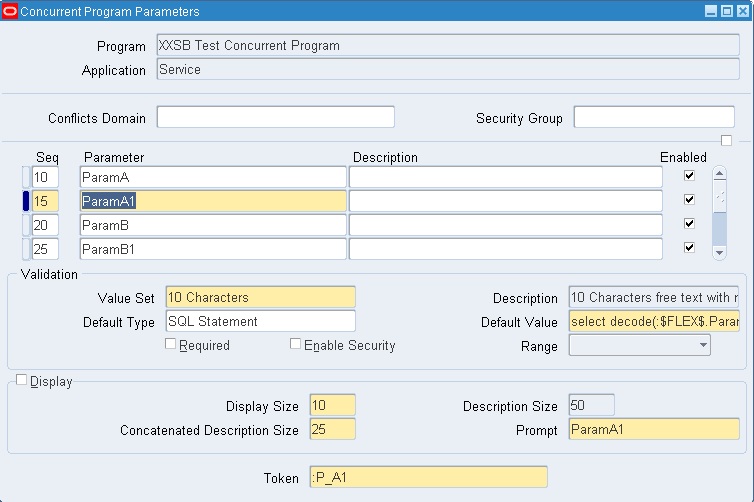
2. The dummy parameter ParamA1 has a seeded character value set attached to it. Note that the Displayed checkbox is unchecked. Its default value is derived from the SQL statement
1
select decode(:$FLEX$.ParamA,'ENABLE_B','Y', null) from dual
The value for this parameter will be ‘Y’ if ParamA has the value ‘ENABLE_B’ and null otherwise
3. ParamB has value set XXSB1_VS2 attached to it.
4. Value set XXSB1_VS2 is of type Table and in the Where/Order By clause the condition :$FLEX$.ParamA1=’Y’ is added
5. The dummy parameter ParamB1 has a seeded character value set attached to it. Note that the Displayed checkbox is unchecked. Its default value is derived from the SQL statement
1
select decode(:$FLEX$.ParamA,'ENABLE_C','Y', null) from dual
The value for this parameter will be ‘Y’ if ParamA has the value ‘ENABLE_C’ and null otherwise
6. ParamC has value set XXSB1_VS3 attached to it.
7. Value set XXSB1_VS3 is of type Table and in the Where/Order By clause the condition :$FLEX$.ParamB1=’Y’ is added.
That is it, all the parameters have now been set up. When the program is run, the second and third parameters are initially disabled like in the previous approach.
Depending on the value of the first parameter, the second and third parameters are enabled or disabled.
The second approach works while the first does not because the Where/Order By clause for one of the value sets always translates to null=’Y’ which cannot be equated and hence the parameter to which it is attached remains disabled.

Oracle Fusion - Cost Lines and Expenditure Item link in Projects

SELECT   ccd.transaction_id,ex.expenditure_item_id,cacat.serial_number FROM fusion.CST_INV_TRANSACTIONS cit,   fusion.cst_cost_distribution_...