Thursday, September 28, 2017

Enabling access to Oracle Forms-based Applications Diagnostics Menu

Enabling access to Oracle Forms-based Applications Diagnostics Menu

The difference between the two screenshots below are that in one of them the the diagnostics menu and submenus are available while in the other they are not.
The diagnostics menu allows users to personalize Forms, generate trace file, examine items etc.  Access to the diagnostics menu and submenu are controlled by the profile option ‘Hide Diagnostics Menu Entry’ about which I had written in an earlier post. However, sometimes even after setting the profile option, users may encounter the message “Function not available to this responsibility. Change responsibilities or contact your System Administrator.” This is because, beginning with Release 12.1.3, access to the diagnostics submenu items can be controlled by the profile option ‘Utilities:Diagnostics’ or by security functions using Role-Based Access Control (RBAC). Whether or not a submenu item is available is checked on an as-needed basis by the system when the user selects the submenu item.
The following table lists the seeded securing functions and their corresponding diagnostics menu items. If the user wants to access the diagnostics menu items from a specific responsibility, adding the functions below to the menu attached to their responsibility would allow them to do so.
Securing Function NameSecuring Function User-Friendly NameInternal Menu NameRuntime Menu Name
FND_DIAGNOSTICS_EXAMINEFND Diagnostics Menu ExamineDIAGNOSTICS
  • EXAMINE
Diagnostics
  • Examine
FND_DIAGNOSTICS_EXAMINE_ROFND Diagnostics Menu Examine Read OnlyDIAGNOSTICS
  • EXAMINE
Diagnostics
  • Examine
FND_DIAGNOSTICS_TRACEFND Diagnostics TraceTRACE
  • NO_TRACE
  • REGULAR
  • BINDS
  • WAITS
  • BINDS_AND_WAITS
  • PLSQL_PROFILING
Diagnostics
  • No Trace
  • Regular Trace
  • Trace with Binds
  • Trace with Waits
  • Trace with Binds and Waits
  • PL/SQL Profiling
FND_DIAGNOSTICS_VALUESFND Diagnostics ValuesPROPERTIES_MENU
  • ITEM
  • FOLDER
Diagnostics – Properties
  • Item
  • Folder
FND_DIAGNOSTICS_VALUES_ROFND Diagnostics Values Read OnlyPROPERTIES_MENU
  • ITEM
  • FOLDER
Diagnostics – Properties
  • Item
  • Folder
FND_DIAGNOSTICS_CUSTOMFND Diagnostics CustomCUSTOM_CODE_MENU
  • NORMAL
  • OFF
  • CORE
  • SHOW_EVENTS
Diagnostics – Custom Code
  • Normal
  • Off
  • Core Code Only
  • Show Custom Events
FND_DIAGNOSTICS_PERSONALIZEFND Diagnostics PersonalizeCUSTOM_CODE_MENU
  • CUSTOMIZE
Diagnostics – Custom Code
  • Personalize
FND_DIAGNOSTICS_PERSONALIZE_ROFND Diagnostics Personalize Read OnlyCUSTOM_CODE_MENU
  • CUSTOMIZE
Diagnostics – Custom Code
  • Personalize
Adding the function ‘FND Diagnostics Personalize Read Only’ to the appropriate menu by navigating to System Administrator>Application>Menu, for example, will allow users to access a read-only version of the Form Personalization screen.
While adding the function ‘FND Diagnostics Personalize’ will allow users to access the normal Form Personalization screen.
In addition to securing functions, access to the diagnostics menu items can also be controlled by assigning permission sets to roles and then assigning the roles to users. The following table lists seeded permission sets.
Permission Set NamePermission Set CodePermissions Assigned
FND Diagnostics Examine MenuFND_DIAGNOSTICS_EXAMINE_PSFND Diagnostics Menu Examine
FND Diagnostics Examine Read OnlyFND_DIAGNOSTICS_EXAMINE_RO_PSFND Diagnostics Menu Examine Read Only
FND Diagnostics Custom MenuFND_DIAGNOSTICS_CUSTOM_PSFND Diagnostics Custom
FND Diagnostics Personalizations MenuFND_DIAGNOSTICS_FORMS_PERS_PSFND Diagnostics Personalize
FND Diagnostics Personalizations Menu Read OnlyFND_DIAGNOSTICS_FRM_PERS_RO_PSFND Diagnostics Personalize Read Only
FND Diagnostics Properties MenuFND_DIAGNOSTICS_PROPERTIES_PSFND Diagnostics Values
FND Diagnostics Properties Menu Read OnlyFND_DIAGNOSTICS_PROP_RO_PSFND Diagnostics Values Read Only
FND Diagnostics Trace MenuFND_DIAGNOSTICS_TRACE_PSFND Diagnostics Trace
FND Diagnostics Menu DeveloperFND_DIAGNOSTICS_DEVELOPER_PS
  • FND Diagnostics Examine
  • FND Diagnostics Personalize
  • FND Diagnostics Trace
  • FND Diagnostics Values
  • FND Diagnostics Custom
FND Diagnostics Menu SupportFND_DIAGNOSTICS_SUPPORT_PS
  • FND Diagnostics Examine Read Only
  • FND Diagnostics Personalize Read Only
  • FND Diagnostics Trace
  • FND Diagnostics Values Read Only
  • FND Diagnostics Custom
Source/further reading: Controlling Access to the Oracle Forms-based Applications Diagnostics Menu(Oracle E-Business Suite System Administrator’s Guide – Configuration)

Finding the name of a DFF in a seeded Form

The first step in enabling a Descriptive Flex Field (DFF) in a seeded Form is to find out the name of the DFF. Identifying a DFF involves the following steps:
1. Navigate to the Form which contains the DFF which needs to be identified. In this example, we will consider the Transactions Form under the Receivables Manager responsibility.
2. Click on the DFF and then go to Help>Diagnostics>Examine to open the  ‘Examine Field and Variable Values’ window, note down the Block and Field names.
3. In the ‘Examine Field and Variable Values’ window, select  $DESCRIPTIVE_FLEXFIELD$ as the Block and enter <BLOCK_NAME>.<FIELD_NAME> as the Field. <BLOCK_NAME> and <FIELD_NAME> are the values obtained in Step#2. Press the TAB key or click on the Value field. The name of the DFF will be displayed in the Value field along with the application under which it is registered.
4. You can now navigate to Application Developer>Flexfield>Descriptive>Register  and execute a query with the DFF name (obtained in Step#3) in the Title field to obtain the complete details of the DFF.

Dynamically enabling and disabling Concurrent Program Parameters

Dynamically enabling and disabling Concurrent Program Parameters

The first approach that might come immediatly to mind is to setup the three parameters ParamA, ParamB and ParamC in the manner and link them up using $FLEX$:
ParamA has value set VS1 attached to it. VS1 is of type Independent and has the values ‘ENABLE_B’ and ‘ENABLE_C’.
ParamB has value set VS2 attached to it. VS2 is of type Table and in the Where/Order By clause the condition :$FLEX$.ParamA=’ENABLE_B’ is added.
ParamC has value set VS3 attached to it. VS3 is of tye Table and in the Where/Order By clause the condition :$FLEX$.ParamA=’ENABLE_C’ is added.
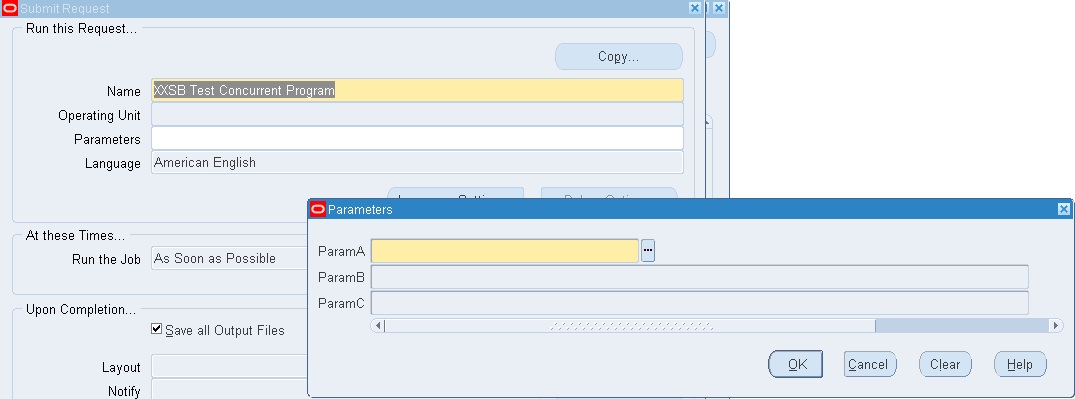
When the program is run, both parameters are initially disabled.
But the moment we select a value for the first parameter, ParamA, both ParamB and ParamC get enabled thus defeating our purpose. The only consolation, if it may be so called, is that the list of value for ParamC contains no values.
The correct approach is to use two additional dummy parameters to enable or disable the second and third parameters. We will look into this appoach in more details.
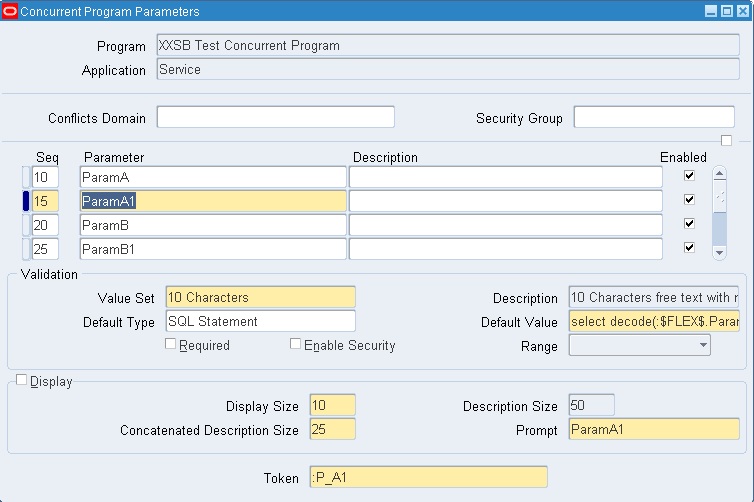
1. ParamA has value set XXSB1_VS1 attached to it. The value set XXSB1_VS1 is of type Independent and contains two values ‘ENABLE_B’ and ‘ENABLE_C’
2. The dummy parameter ParamA1 has a seeded character value set attached to it. Note that the Displayed checkbox is unchecked. Its default value is derived from the SQL statement
1
select decode(:$FLEX$.ParamA,'ENABLE_B','Y', null) from dual
The value for this parameter will be ‘Y’ if ParamA has the value ‘ENABLE_B’ and null otherwise
3. ParamB has value set XXSB1_VS2 attached to it.
4. Value set XXSB1_VS2 is of type Table and in the Where/Order By clause the condition :$FLEX$.ParamA1=’Y’ is added
5. The dummy parameter ParamB1 has a seeded character value set attached to it. Note that the Displayed checkbox is unchecked. Its default value is derived from the SQL statement
1
select decode(:$FLEX$.ParamA,'ENABLE_C','Y', null) from dual
The value for this parameter will be ‘Y’ if ParamA has the value ‘ENABLE_C’ and null otherwise
6. ParamC has value set XXSB1_VS3 attached to it.
7. Value set XXSB1_VS3 is of type Table and in the Where/Order By clause the condition :$FLEX$.ParamB1=’Y’ is added.
That is it, all the parameters have now been set up. When the program is run, the second and third parameters are initially disabled like in the previous approach.
Depending on the value of the first parameter, the second and third parameters are enabled or disabled.
The second approach works while the first does not because the Where/Order By clause for one of the value sets always translates to null=’Y’ which cannot be equated and hence the parameter to which it is attached remains disabled.

Wednesday, August 2, 2017

Bulk  Mechanism
IT IS USED TO REDUCE THE TIME TAKEN TO RETREVE THE DATA
àBulk is one of the method to improve the performance of the applications
2 types:
                1:Bulk Collect
                2:Bulk binding
 1:Bulk Collect    In this clause we are used to fetch the data from database  into collection.
                            àselect ……into…clause
                            Ã cursor ….fetch…..statement
                            àdml ….returning
bulk collect practise
=====================

declare
type t1 is table of jacmel.jmplan_temp%rowtype index by binary_integer;
v1   t1;
begin
select * bulk collect into v1 from jacmel.jmplan_temp;
for i in v1.first..v1.last
loop
dbms_output.put_line(v1(i).SEGMENT1||','||v1(i).ATTR1||','||v1(i).CUSTOMER_NUMBER);
end loop;
end;
Example for bulk collect by 2 variables
---------------------------------------
DECLARE
type t1
IS
  TABLE OF VARCHAR2(50) INDEX BY binary_integer;
  v1 t1;
  v2 t1;
  CURSOR c1
  IS
    SELECT SEGMENT1,attr1 FROM jacmel.jmplan_temp;
BEGIN
  OPEN c1;
  FETCH c1 bulk collect INTO v1,v2;
  CLOSE c1;
  FOR i IN v1.first..v1.last
  LOOP
    dbms_output.put_line(v1(i)||','||v1(i));
  END LOOP;
END;


example with out bulk collect method
declare
vrow VARCHAR2(30);
cursor c1 is select distinct name from wsh_deliverable_trips_v;
z1 number(10);
z2 number(10);
begin
z1:=dbms_utility.get_time;
open c1;
loop
fetch c1 into vrow;
exit when c1%notfound;
end loop;
close c1;
z2:=dbms_utility.get_time;
dbms_output.put_line(z1);
dbms_output.put_line(z2);
dbms_output.put_line(z2-z1);
end;
/
example with bulk method
declare
type t1 is table of varchar2(30) index by binary_integer;
v1 t1;
cursor c1 is select distinct name from wsh_deliverable_trips_v;
z1 number(10);
z2 number(10);
begin
z1:=dbms_utility.get_time;
open c1;
loop
fetch c1 bulk collect into v1;
exit when c1%notfound;
end loop;
close c1;
z2:=dbms_utility.get_time;
dbms_output.put_line(z1);
dbms_output.put_line(z2);
dbms_output.put_line(z2-z1);
end;

/

Oracle Fusion - Cost Lines and Expenditure Item link in Projects

SELECT   ccd.transaction_id,ex.expenditure_item_id,cacat.serial_number FROM fusion.CST_INV_TRANSACTIONS cit,   fusion.cst_cost_distribution_...