Thursday, October 19, 2017

Order to Cash - Technical Flow in R12


 1. Order Entry
Step 1  Enter header detail, Once after entering the header details on the order header tab , click on the save button or move to lines tab. The order header gets saved and a record will insert into OE_ORDER_HEADERS_ALL with FLOW_STATUS_CODE as ENTERED , OPEN_FLAG as Y and BOOKED_FLAG as N . Header is the primary key in OE_ORDER_HEADERS_ALL
·         In the Lines tab of the order Enter item name / number, quantity and other details in line tab. Click on the Save button. After saving the line, the line data get inserts into OE_ORDER_LINES_ALL  withFLOW_STATUS_CODE = ENTERED, BOOKED_FLAG = N, OPEN_FLAG = Y  and also records will be inserted into OE_SETS with ship set details of the order.
         Primary key is the LINE_ID in OE_ORDER_LINES_ALL and the HEADER_ID is the join between OE_ORDER_HEADERS_ALL and OE_ORDER_LINES_ALL.
        SHIP_SET_ID is the join between OE_ORDER_LINES_ALL(SHIP_SET_ID) and OE_SETS(SET_ID).
     SET_ID is the primary column in OE_SETS.

2.Order Booking

Step 2 , when Order is booked then the Flow status changed from Entered to Booked. At this stage, these below table are updated.
·         OE_ORDER_HEADERS_ALL (FLOW_STATUS_CODE = BOOKED, BOOKED_FLAG updated to Y)
·         OE_ORDER_LINES_ALL (FLOW_STATUS_CODE as AWAITING_SHIPPING, BOOKED_FLAG updated Y)
·         WSH_DELIVERY_DETAILS (DELIVERY_DETAIL_ID is assigned here, RELEASED_STATUS ‘R’ ready to release, LINE_ID comes as SOURCE_LINE_ID)
·         WSH_DELIVERY_ASSIGNMENTS (DELIVERY_ASSIGNMENT_ID is assigned for DELIVERY_DETAIL_ID present in WSH_DELIVERY_DETAILS, DELIVERY_ID remains blank till this stage)
*In shipping transaction form order status remains "Ready to Release".
At the same time, Demand interface program runs in background And insert into inventory tables MTL_DEMAND, here LINE_ID come as a reference in DEMAND_SOURCE_LINE
3. Reservation

This step is required for doing reservations SCHEDULE ORDER PROGRAM runs in the background and quantities are reserved. Once this program get successfully get completed, the MTL_DEMAND and MTL_RESERVATIONS table get updated. LINE_ID gets updated in DEMAND_SOURCE_LINE_ID in both the tables.
4. Pick Release
Pick Release is the process of putting reservation on on-hand quantity available in the inventory and pick them for particular sales order.
Pick release can be done from 'Release Sales Order' form or 'Pick release SRS' program can be scheduled in background. In both of these cases all lines of the order gets pick released depending on the Picking rule used. If specific line/s needs to be pick release it can be done from 'Shipping Transaction form. For this case Pick Release is done from 'Release Sales Order' form with Pick Confirm=NO.
Once pick release is done these are the tables get affected:
·         If step 3 is not done then MTL_RESERVATIONS gets updated now.
·         WSH_NEW_DELIVERIES (one record gets inserted with SOURCE_HEADER_ID= order header ID, STATUS_CODE=OP =>open)
·         WSH_DELIVERY_ASSIGNMENTS (DELIVERY_ID gets assigned which comes from WSH_NEW_DELIVERIES)
·         WSH_DELIVERY_DETAILS (RELEASED_STATUS ‘S’ ‘submitted for release’)
·         MTL_TXN_REQUEST_HEADERS
·         MTL_TXN_REQUEST_LINES (LINE_ID goes as TXN_SOURCE_LINE_ID)
·         (move order tables. Here request is generated to move item from Source (RM or FG) sub-inventory to staging sub-inventory)
·         MTL_MATERIAL_TRANSACTIONS_TEMP (link to above tables through MOVE_ORDER_HEADER_ID/LINE_ID, this table holds the record temporally)
·         MTL_SERIAL_NUMBERS_TEMP (if item is serial controlled at receipt then record goes in this table)
·         MTL_SERIAL_NUMBERS (enter value in GROUP_MARK_ID )
*In shipping transaction form order status remains "Released to Warehouse" and all the material still remains in source sub-inventory. We need to do Move Order Transaction for this order. Till this no material transaction has been posted to MTL_MATERIAL_TRANSACTIONS
5.Pick Confirm/ Move Order Transaction
Items are transferred from source sub-inventory to staging Sub-inventory. Here material transaction occurs.
Order line status becomes 'Picked' on Sales Order and 'Staged/Pick Confirmed' on Shipping Transaction Form.
·         MTL_MATERIAL_TRANSACTIONS_TEMP (Record gets deleted from here and gets posted to MTL_MATERIAL_TRANSACTIONS)
·         OE_ORDER_LINES_ALL (FLOW_STATUS_CODE ‘PICKED’ )
·         MTL_MATERIAL_TRANSACTIONS (LINE_ID goes as TRX_SOURCE_LINE_ID)
·         MTL_TRANSACTION_ACCOUNTS
·         WSH_DELIVERY_DETAILS (RELEASED_STATUS becomes ‘Y’ => ‘Released’ )
·         WSH_DELIVERY_ASSIGNMENTS
·         MTL_ONHAND_QUANTITIES
·         MTL_SERIAL_NUMBERS_TEMP (record gets inserted after putting details for the item which are serial controlled at 'Sales order issue')
·         MTL_SERIAL_NUMBERS (record gets inserted after putting details for the item which are serial controlled at 'Sales order issue')
* This step can be eliminated if we set Pick Confirm=YES at the time of Pick Release

6.Ship Confirm

Here ship confirm interface program runs in background. Data removed from WSH_NEW_DELIVERIES.
The items on the delivery gets shipped to customer at this stage.
·         OE_ORDER_LINES_ALL (FLOW_STATUS_CODE ‘shipped’)
·         WSH_DELIVERY_DETAILS (RELEASED_STATUS ‘C’ ‘Shipped’, SERIAL_NUMBER if quantity is ONE)
·         WSH_SERIAL_NUMBERS (records gets inserted with the DELIVERY_DETAIL_ID reference, only in case of shipped quantity is two or more)
·         MTL_TRANSACTION_INTERFACE
·         MTL_MATERIAL_TRANSACTIONS (linked through Transaction source header id)
·         MTL_TRANSACTION_ACCOUNTS
·         Data deleted from MTL_DEMAND, MTL_RESERVATIONS
·         Item deducted from MTL_ONHAND_QUANTITIES
·         MTL_SERIAL_NUMBERS_TEMP (records gets deleted from this table)
·         MTL_SERIAL_NUMBERS (Serial number stauts gets updated CURRENT_STATUS=4 , 'Issued out of store')

7.Enter Invoice
After shipping the order lines is eligible for Invoice. The Workflow background engine picks the Invoice eligible records and post it to the below interface tables.
RA_INTERFACE_LINES_ALL  
RA_INTERFACE_SALESCREDITS_ALL 
RA_INTERFACE_DISTRIBUTIONS_ALL

RA_INTERFACE_LINES_ALL  -- Sale order and order line information.
RA_INTERFACE_SALESCREDITS_ALL --This table contains all sales credit information for the sales order
RA_INTERFACE_DISTRIBUTIONS_ALL --This table contains accounting distributions to be used by the transactions defined in RA_INTERFACE_LINES_ALL.

Then Autoinvoice concurrent program imports data from the above interface tables to the RA_CUSTOMER_TRX_ALL
TRX_NUMBER is the invoice number
 CUST_TRX_ID is the key to link to TRX_LINES table 
IN RA_CUSTOMER_TRX_LINES_ALL 
LINE_ATTRIBUTE_1 stores the order number 
LINE_ATTRIBUTE_6  stores teh LINE_ID of the order

8.Complete Line
After pushing the data  to AR interface tables the workflow back ground engine updates the lines flow status and the open flag 
OE_ORDER_LINES_ALL (FLOW_STATUS_CODE ‘CLOSED’, OPEN_FLAG “N”)

9.Close Order
  Once all the lines of the sales order is closed then at the last day of the month the workflow back ground engine update the flow status code of the order to Closed and open flag to N.

Wednesday, October 18, 2017

PROFILE OPTIONS IN ORACLE APPS R12 - OVERVIEW (FND PROFILE)

Profiles are the changeable options which affect the way Oracle Application runs. Moreover, Moreover, The profile option acts like a Global Variable in Oracle. It is needed to provide the flexibility to Oracle Applications.

Types:

The profiles are of two types those are given below.
1. System Profile and
2. User Profile.

About DIFFERENT LEVELS a Profile value can be set:

The Profile values will be set in different levels those are given below.
1. Site
2. Application
3. Responsibility
4. User
5. Server
6. Organization

Site: This field displays the current value, if set, for all users at the installation site.
Application: This field displays the current value, if set, for all users working under responsibilities owned by the application identified in the Find Profile Values block.
Responsibility: This field displays the current value, if set, for all users working under the responsibility identified in the Find Profile Values block.
User: This field displays the current value, if set, for the application user identified in the Find Profile Values block.
Profile: Enter the name of the profile option whose values you wish to display.

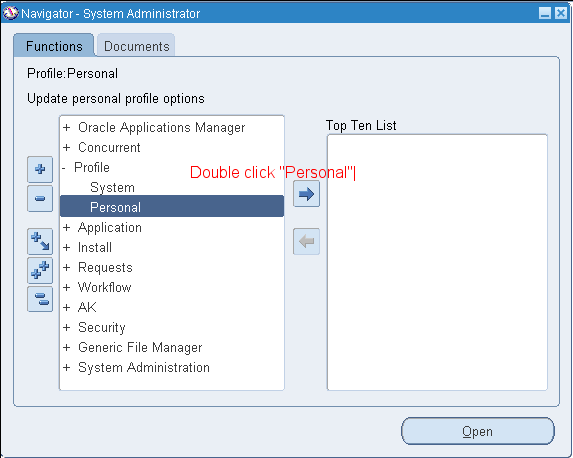
Navigation to set Profile Values

 SYSTEM PROFILE: 

Responsibility SYSTEM ADMINISTRATOR -->


You may search for profile options using character strings and the wildcard symbol (%). For example, to find all the profile options prefixed by "Concurrent:” you could enter "Conc%" and press the Find button.


PERSONAL PROFILE:

Responsibility SYSTEM ADMINISTRATOR -->

To view personal profiles enter into the query mode and enter the profile name which we have already then we get profile value details.


To check the validation done against the Profile value while setting:

Responsibility APPLICATION DEVELOPER -->


Use of the API FND_PROFILE

It is used to perform various actions related to profile values through PL/SQL. Some of the important ones are listed below

1. FND_PROFILE.GET(‘Name of the Profile’, variable name);
Example
SELECT fnd_profile.value('PROFILEOPTION')
      ,fnd_profile.value('MFG_ORGANIZATION_ID')
      ,fnd_profile.value('ORG_ID')
      ,fnd_profile.value('LOGIN_ID')
      ,fnd_profile.value('USER_ID')
      ,fnd_profile.value('USERNAME')
      ,fnd_profile.value('CONCURRENT_REQUEST_ID')
      ,fnd_profile.value('GL_SET_OF_BKS_ID')
      ,fnd_profile.value('SO_ORGANIZATION_ID')
      ,fnd_profile.value('APPL_SHRT_NAME')
      ,fnd_profile.value('RESP_NAME')
      ,fnd_profile.value('RESP_ID')
  FROM DUAL;


2. variable name := FND_PROFILE.VALUE(‘Name of the profile’);
3. FND_PROFILE.PUT(‘Name of the profile’, value of the profile);

Example
SET SERVEROUTPUT ON;
DECLARE
   v_conc_login_id      NUMBER;
BEGIN
   FND_PROFILE.put ('CONC_LOGIN_ID',1425);
   fnd_profile.get ('CONC_LOGIN_ID', v_conc_login_id);
   DBMS_OUTPUT.put_line (v_conc_login_id);
END;
Output:
1425
PL/SQL procedure successfully completed

The 1st and 2nd are same but, the only difference is FND_PROFILE.GET is the procedure and FND_PROFILE.VALUE is the function so, it return a value.  

Apart from the above procedures we have another important one named FND_PROFILE .SAVE used to set the profile values from backend. A detail regarding this API is available in another article. 

Interface error tables in Oracle Apps


Following are the interface error tables used in oracle apps:

This table stores the processing messages which will be generated during Order Entry concurrent program execution or UI process. This is a multi-lingual table.

SELECT OPT.*
  FROM OE_PROCESSING_MSGS OPM, OE_PROCESSING_MSGS_TL OPT
 WHERE     OPM.TRANSACTION_ID = OPT.TRANSACTION_ID
       AND OPT.LANGUAGE = 'US'
       AND ORIGINAL_SYS_DOCUMENT_REF = LV_DOC_REF

PO_INTERFACE_ERRORS contains error message information generated by the open interface programs in Oracle Purchasing. For every interface transaction row with errors, this table contains a row for each column that has an error.

SELECT *
  FROM PO_INTERFACE_ERRORS
 WHERE INTERFACE_LINE_ID = LN_INT_TRX_ID -- interface transaction id


MTL_TRANSACTIONS_INTERFACE allows calling applications to post material transactions (movements, issues, receipts etc. to Oracle Inventory transaction module.

The Transaction Manager picks up the rows to process based on the LOCK_FLAG, TRANSACTION_MODE, PROCESS_FLAG. Only records with TRANSACTION_MODE of '3', LOCK_FLAG of '2', and PROCESS_FLAG of '1' will be picked up by the Transaction Manager and assigned to a Transaction Worker. If a record fails to process completely, then PROCESS_FLAG will be set to '3' and ERROR_CODE and ERROR_EXPLANATION will be populated with the cause for the error.

SELECT ERROR_CODE,
            ERROR_EXPLANATION
  FROM MTL_TRANSACTIONS_INTERFACE
 WHERE TRANSACTION_REFERENCE = LN_TRX_REF


Interface data that failed in AutoInvoice validation are populated with the error details

SELECT *
  FROM RA_INTERFACE_ERRORS_ALL
 WHERE INTERFACE_LINE_ID = LN_INTF_ID


The HZ_PARTY_INTERFACE_ERRORS table contains the error messages that are generated while mapping data from the HZ_PARTY_INTERFACE table into other HZ tables.

SELECT *
  FROM HZ_PARTY_INTERFACE_ERRORS
 WHERE PARTY_INTERFACE_ID = LN_PARTY_INTEFACE_ID


MTL_INTERFACE_ERRORS stores errors that occur during the item interface process reporting where the errors occurred along with the error messages.

SELECT *
  FROM MTL_INTERFACE_ERRORS
 WHERE TRANSACTION_ID = LN_TRX_ID --Row identifier for row in MTL_SYSTEM_ITEMS_INTERFACE

  
WIP_INTERFACE_ERRORS stores the text of errors or warnings issued when loading information through the WIP Scheduling and Open Job and Schedule interfaces. It also stores information about the load requests that generate the errors. When the WIP Mass Load program loads records from the WIP Scheduling Interface, you can print a report showing these errors.

SELECT *
  FROM WIP_INTERFACE_ERRORS
 WHERE INTERFACE_ID = LN_INTF_ID


AP_INTERFACE_REJECTIONS stores information about invoice data from the AP_INVOICES_INTERFACE and AP_INVOICE_LINES_INTERFACE tables which could not be processed by Payables Open Interface Import.

SELECT * FROM AP_INTERFACE_REJECTIONS

Monday, October 16, 2017

Oracle Pricing Table list

QP_LIST_HEADERS_B
QP_LIST_HEADERS_B stores the header information for all lists. List types can be, for example, Price Lists, Discount Lists or Promotions.

QP_LIST_LINES
QP_LIST_LINES stores all list lines for lists in QP_LIST_HEADERS_B. This table stores all types of list lines; price list lines, all types of modifiers including price modifier list lines used to derive factors. The different types of list lines are based on Lookup Type, 'LIST_LINE_TYPE_CODE'.

QP_PRICING_ATTRIBUTES
QP_PRICING_ATTRIBUTES stores product information and pricing attributes. The PRODUCT_ATTRIBUTE and PRODUCT_ATTRIBUTE_VALUE columns identify the product or level in the item hierarchy, i.e item context at which the price or modifier is set. The PRICING_ATTRIBUTE_CONTEXT, PRICING_ATTRIBUTE and PRICING_ATTR_VALUE_FROM columns store the pricing attributes which further define what is being priced. If the PRICING_ATTRIBUTE_CONTEXT is VOLUME the pricing attributes column stores the break unit attribute, e.g. item quantity and both the PRICING_ATTR_VALUE_FROM and PRICING_ATTR_VALUE_TO columns can be populated. The Product information is repeated for all pricing attributes. A record is always created for the VOLUME context which may or may not have an attribute defined.
Tables 

Qp_interface_list_header  
qp_interface_list_lines  
qp_interface_qualifiers  
qp_interface_pricing_attribs  
qp_interface_errors  
qp_list_headers_b  
qp_list_headers_tl  
qp_list_lines  
qp_qualifiers  
qp_pricing_attributes  
qp_rltd_modifiers


Relationship

QP_LIST_HEADERS_B  <---LIST_HEADER_ID ---> QP_LIST_LINES

QP_LIST_LINES <---LIST_HEADER_ID,LIST_LINE_ID ---> QP_PRICING_ATTRIBUTES

QP_PRICING_ATTRIBUTES <---PRODUCT_ATTR_VALUE <> TO_CHAR(MSI.INVENTORY_ITEM_ID)---> mtl_system_items_b

Useful Queries


    /* Formatted on 7/18/2014 11:02:10 AM (QP5 v5.115.810.9015) */
SELECT *
FROM qp_list_headers_b
WHERE list_header_id IN (SELECT list_header_id
                         FROM qp_list_headers_tl
                         WHERE name = 'Corporate');           --Price List Name
    
/* Formatted on 7/18/2014 11:02:04 AM (QP5 v5.115.810.9015) */
SELECT line.*
FROM qp_list_lines line, qp_list_headers_b header
WHERE line.list_header_id = header.list_header_id
      AND line.list_header_id IN (SELECT list_header_id
                                  FROM qp_list_headers_tl
                                  WHERE name = 'Corporate'); --Price List Name
    
    
/* Formatted on 7/18/2014 11:01:59 AM (QP5 v5.115.810.9015) */
SELECT *
FROM qp_list_headers_b spl, qp_list_lines spll, qp_pricing_attributes qpa
WHERE     spll.list_header_id = spl.list_header_id
      AND qpa.list_header_id = spl.list_header_id
      AND spll.list_line_id = qpa.list_line_id
      AND qpa.list_header_id IN (SELECT list_header_id
                                 FROM qp_list_headers_tl
                                 WHERE name = 'Corporate');--Price List Name
    
/* Formatted on 7/18/2014 11:01:53 AM (QP5 v5.115.810.9015) */
SELECT qpa.*
FROM qp_list_headers_b spl,
     qp_list_lines spll,
     qp_pricing_attributes qpa,
     mtl_system_items_b msi
WHERE     msi.organization_id = 244
      AND msi.inventory_item_id = 434257
      AND spl.list_header_id = 164075
      AND spll.list_header_id = spl.list_header_id
      AND qpa.list_header_id = spl.list_header_id
      AND spll.list_line_id = qpa.list_line_id
      AND qpa.product_attribute_context = 'ITEM'
      AND qpa.product_attribute = 'PRICING_ATTRIBUTE1'
      AND qpa.product_attr_value = TO_CHAR (msi.inventory_item_id)
      AND qpa.product_uom_code = msi.primary_uom_code
      AND qpa.pricing_attribute_context IS NULL
      AND qpa.excluder_flag = 'N'
      AND qpa.pricing_phase_id = 1;
    /* Formatted on 7/18/2014 11:01:45 AM (QP5 v5.115.810.9015) */
SELECT *
FROM qp_list_headers_b
WHERE list_header_id IN (SELECT list_header_id
                         FROM qp_list_headers_tl
                         WHERE name = 'Corporate');                --Price List Name
    
/* Formatted on 7/18/2014 11:01:35 AM (QP5 v5.115.810.9015) */
SELECT line.*
FROM qp_list_lines line, qp_list_headers_b header
WHERE line.list_header_id = header.list_header_id
      AND line.list_header_id IN (SELECT list_header_id
                                  FROM qp_list_headers_tl
                                  WHERE name = 'Corporate'); --Price List Name
    
    
/* Formatted on 7/18/2014 11:01:29 AM (QP5 v5.115.810.9015) */
SELECT *
FROM qp_list_headers_b spl, qp_list_lines spll, qp_pricing_attributes qpa
WHERE     spll.list_header_id = spl.list_header_id
      AND qpa.list_header_id = spl.list_header_id
      AND spll.list_line_id = qpa.list_line_id
      AND qpa.list_header_id IN (SELECT list_header_id
                                 FROM qp_list_headers_tl
                                 WHERE name = 'Corporate');       --Price List Name


  /* Formatted on 7/18/2014 11:01:23 AM (QP5 v5.115.810.9015) */
SELECT qpa.*
FROM qp_list_headers_b spl,
     qp_list_lines spll,
     qp_pricing_attributes qpa,
     mtl_system_items_b msi
WHERE     msi.organization_id = 244
      AND msi.inventory_item_id = 434257
      AND spl.list_header_id = 164075
      AND spll.list_header_id = spl.list_header_id
      AND qpa.list_header_id = spl.list_header_id
      AND spll.list_line_id = qpa.list_line_id
      AND qpa.product_attribute_context = 'ITEM'
      AND qpa.product_attribute = 'PRICING_ATTRIBUTE1'
      AND qpa.product_attr_value = TO_CHAR (msi.inventory_item_id)
      AND qpa.product_uom_code = msi.primary_uom_code
      AND qpa.pricing_attribute_context IS NULL
      AND qpa.excluder_flag = 'N'
      AND qpa.pricing_phase_id = 1;

Oracle Fusion - Cost Lines and Expenditure Item link in Projects

SELECT   ccd.transaction_id,ex.expenditure_item_id,cacat.serial_number FROM fusion.CST_INV_TRANSACTIONS cit,   fusion.cst_cost_distribution_...